
Homebase Review
Free-to-start scheduling, time tracking, and payroll for hourly teams
Starting at
Free – $96+/mo
Best for
Small businesses with hourly, shift-based teams
Quick verdict: Homebase is best for small businesses with hourly, shift-based teams — solid, with one trade-off worth reading before you commit.
Free – $96+/mo
Pricing and product details sourced from the vendor's official site.
Homebase brings together shift scheduling, time tracking, and team messaging in a single app aimed squarely at small businesses with hourly, deskless teams — retail, food service, and similar industries. Its free tier is genuinely usable for a single location, which makes it one of the more accessible entry points in this category.
Pros & Cons
Pros
- Genuinely usable free tier — not just a crippled trial
- Purpose-built for shift-based, hourly teams rather than adapted from a salaried-employee tool
- Combines scheduling, time tracking, and team messaging in one simple app
Cons
- Less depth for salaried, non-shift workforces
- Advanced HR and analytics features require upgrading beyond the free tier
Key Features
- Shift scheduling with conflict detection
- Time clock with GPS/photo verification
- Built-in team messaging
- Basic payroll integration
Pricing
Basic
Free
Single location, small teams
- Scheduling
- Time clock
Essentials
$24/mo per location
Growing small businesses
- Team communication
- Labor cost tracking
Plus
$56/mo per location
Multi-location operations
- AI scheduling assistant
- PTO/time-off controls
All-in-One
$96/mo per location
Multi-location operations needing HR compliance
- Advanced scheduling
- HR compliance tools
Screenshots
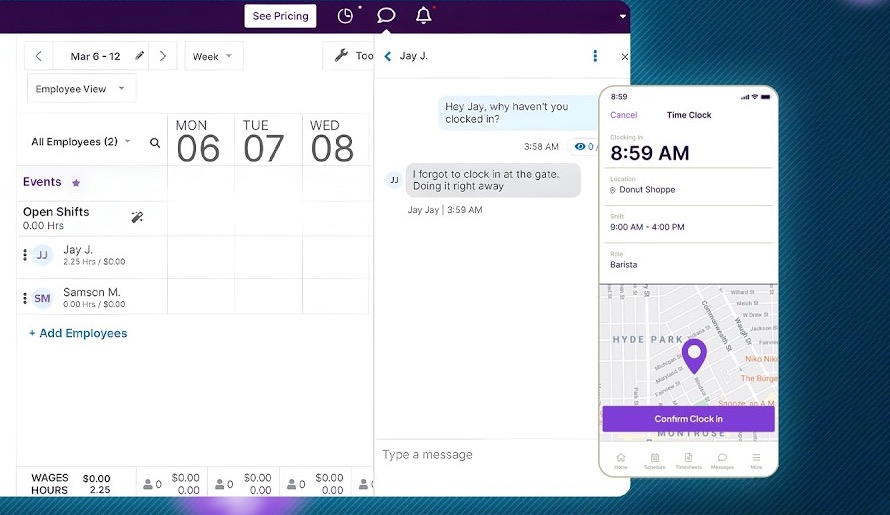
Official product screenshots published by Homebase, not independently captured by us — see our Methodology.
Integrations
Integration list reflects what we found in vendor documentation at time of research — always confirm current integration depth directly with Homebase before purchasing.
Customer Support
We haven't independently verified Homebase's specific support channels, hours, or SLA tiers yet. Confirm current support details directly on Homebase's website before purchasing.
Security & Compliance
We haven't independently verified specific security certifications (SOC 2, GDPR, etc.) for Homebase yet. If handling sensitive HR or payroll data is a requirement, confirm current certifications directly with the vendor before signing a contract.
Ready to try Homebase?
Visit the official site to see current pricing.
Some links on this page are affiliate links — see our Affiliate Disclosure. This never affects the verdict above; see our Methodology.
Alternatives to Homebase
Comparisons Worth Reading
Related Reviews


Related Coverage
Best AI Payroll Software for Small Business in 2026
Read article
AI HR Tools for Small Teams vs Enterprises: What Actually Changes
Read article
The Real Cost of AI HR Software: Pricing Models Explained
Read article
Best AI Scheduling Software in 2026
Read article
Homebase vs Gusto: Free Shift Scheduling or Small-Business Payroll?
Read article
AI HR Software Pricing Transparency: A First-Party Analysis of Our Catalog
Read article
Deputy vs Homebase: Which Fits Your Scheduling Needs?
Read article
Frequently Asked Questions
Yes, for a single location with core scheduling and time-clock features — paid tiers add team communication, labor cost tracking, and multi-location support.
Our Verdict
Worth a LookHomebase looks like a fit for small businesses with hourly, shift-based teams. It's worth considering, with a real trade-off to weigh before committing — check the Cons above.
This verdict is based on publicly available research — vendor documentation, pricing pages, and third-party reviews — not first-hand, hands-on testing.
Homebase
Free – $96+/mo